
Sales funnel
The Sales funnel page shows how leads move from first contact to contract, and where they stall or drop. It has two tabs: Funnel, with the numbers and conversion rates for a period, and Pipeline board, with every open lead as a card in its stage that you can drag to the next one. Managers use it in sales meetings; agents and team leaders use it to see and move their own pipeline. Open it from Sales funnel in the menu.
Who sees what
The page uses the same rules as the leads list: agents see their own leads, team leaders their team's leads, and sales managers and admins the whole company. Marketing can open it too.
The Funnel tab
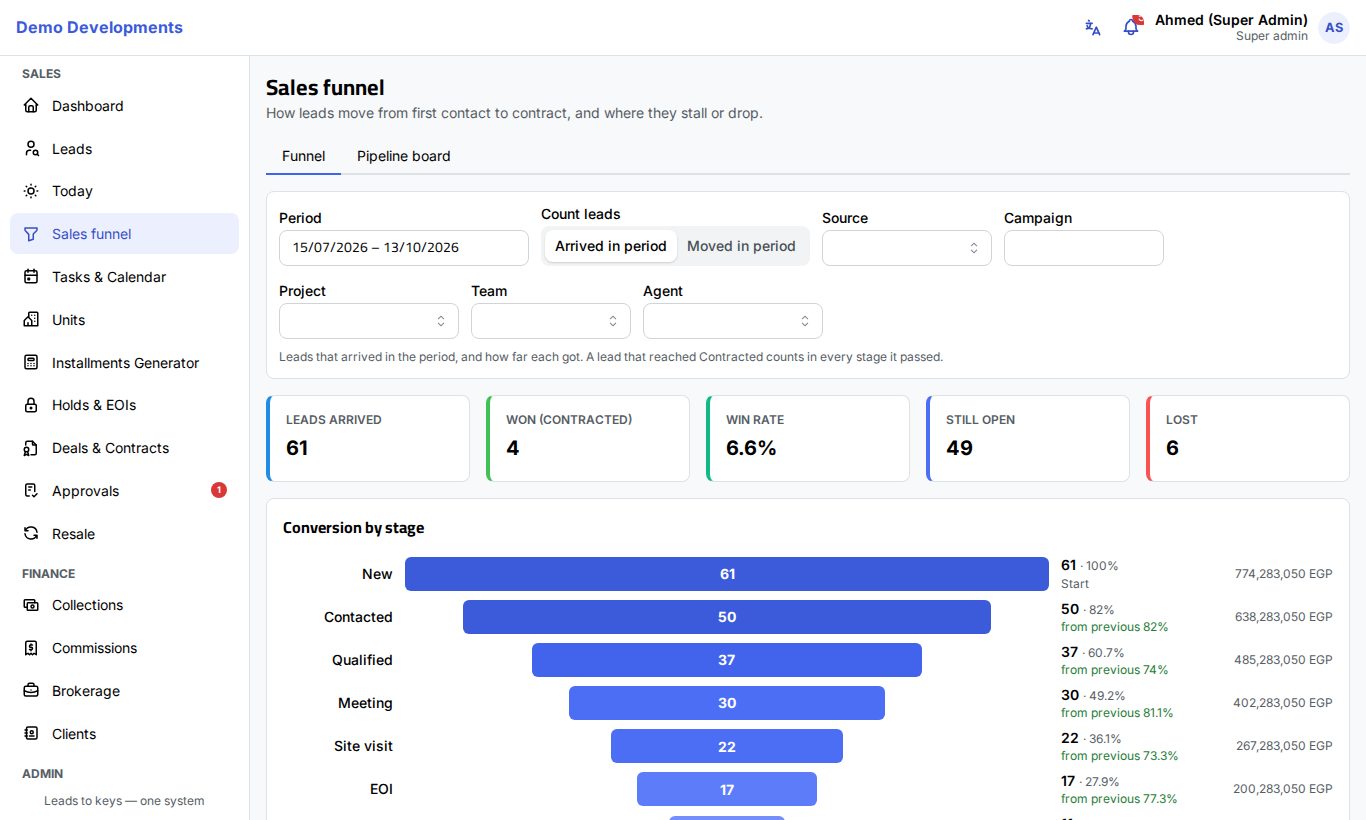
Choose the period and how to count
- Pick the Period (the last 90 days by default).
- Under Count leads, choose:
- Arrived in period: the leads that arrived in the period, and how far each got. A lead that reached Contracted counts in every stage it passed.
- Moved in period: every lead that moved into each stage during the period, whenever it first arrived.
- Narrow it down with Source, Campaign and Project. Anyone who sees more than their own leads also has Team and Agent.
What the numbers mean
- Summary cards: Leads arrived (or Leads that moved), Won (contracted), Win rate, Still open and Lost.
- Conversion by stage: one bar per stage, as wide as its share of the first stage, so you see at a glance where the funnel narrows. Next to each bar: the number of leads, the percentage of the start, and the percentage from previous (green from 50%, orange from 25%, red below), and the value. Point at a bar for its count, value and average days.
- Time in stage: the average number of days a lead stays in each stage before moving on. Only stays that are finished are counted.
- Where leads are lost: for each stage, how many leads were lost after reaching it and the top reasons. This table needs Arrived in period.
- Compare: the same funnel side by side by Source, Campaign or Project (and Team or Agent for managers): number of leads, how many reached each stage (with the percentage), Win rate and Won value.
The value of a lead is the net price of its deal once it is reserved, and its budget before that. Fill in budgets on leads to get meaningful values.
The Pipeline board
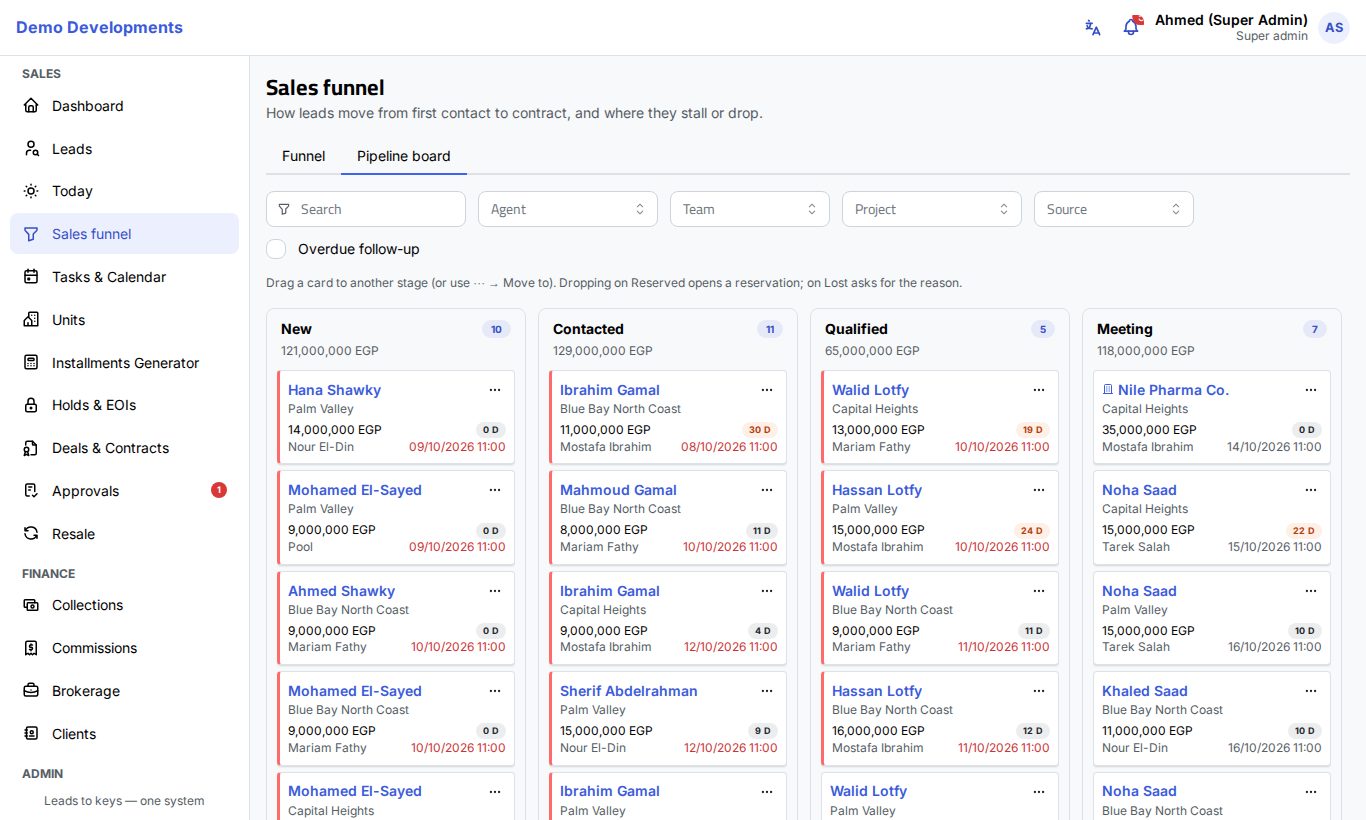
The Pipeline board shows every open lead as a card in a column for its stage. Your company's own steps get their own column right after their stage (shown with ↳). Each column shows the number of leads and the total of their budgets.
A card shows the lead's name (with a building icon for companies), the project, the budget, the days in this stage (orange after 14 days), the agent (or Pool) and the next follow-up. A card with an overdue follow-up has a red edge. Click the name to open the lead page.
Each column lists the leads with the nearest follow-up first. When a column has more leads than it shows, click see all at its bottom to open them in the leads list.
Filter the board
Use Search (name, phone or a contact person's name), Project and Source, and tick Overdue follow-up to keep only the leads that are late. Team leaders and managers also have Agent and Team.
Move a lead to another stage
- Drag the card to another column, or click ⋯ on the card and choose a stage under Move to.
- In the window that opens, check the Next follow-up (it is proposed for two days later at 11:00) and add Notes if useful.
- Click Confirm. The card moves and the change is recorded in the lead's timeline.
Two areas sit at the end of the board:
- Drop a card on Reserved to open a new reservation for the lead; see Deals & contracts.
- Drop a card on Lost to mark it lost: you must choose the Lost reason before confirming.
Using the funnel in meetings
- Start with the Funnel tab for last month or quarter (Arrived in period): look at the win rate and at the stage where the from previous percentage turns red; that is where to focus.
- Open Compare → Source or Campaign to see which ads bring leads that actually buy, not just many leads.
- Look at Where leads are lost to discuss the top reasons (price, budget, no answer…) and what can be done about them.
- Switch to the Pipeline board, choose an Agent or Team, and tick Overdue follow-up to go through the late leads one by one. Cards with many days in their stage are the ones getting stuck.
Good to know
- The board shows open leads only: a Reserved column holds the leads with a reservation, and leads that are Contracted or Lost leave the board. Dropping a card on Reserved never changes the stage by itself; it opens a reservation, and the stage changes when the reservation is made.
- Time in stage is exact from the moment stage history started being recorded; older leads only have the dates already on record.
- Hidden stages are left out of the board, and stage names follow your company's own names.