Contract templates
A contract template is the text of your sales contract with placeholders such as or where the deal's details go. When someone generates a contract on a deal, the CRM fills in the placeholders and the contract is ready to review and print. Company admins manage the templates on Settings → Contract templates.
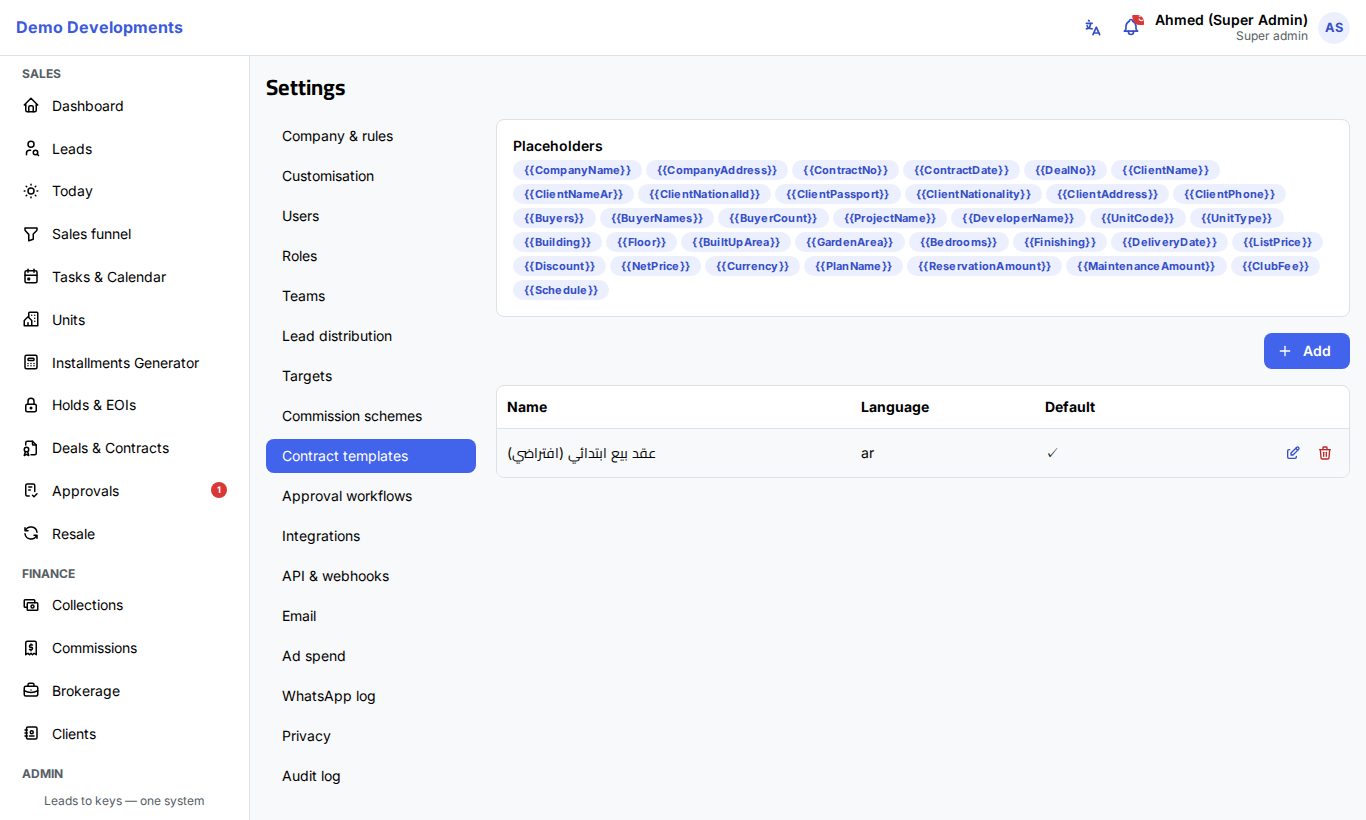
Every new company starts with one Arabic template, عقد بيع ابتدائي (افتراضي) (a preliminary sales contract). You can change it or add your own, for example one per project or one in English.
Add a template
- Open Settings → Contract templates and click Add.
- Fill in:
- Name (required): the name people see when they generate a contract, so make it clear, for example "Palm Valley – villas".
- Language (required): for example
aroren. - Project (optional): the project the template is written for. Leave it empty for a template that fits all projects.
- Default: tick it for your main template.
- Body (required): the contract text with placeholders.
- Click Save.
To change or delete a template, use the edit and delete buttons next to it in the list.
Use placeholders
The Placeholders card at the top of the page lists every placeholder. Click one to copy it, then paste it into the Body where the value should go. Write each placeholder exactly as shown, with the double curly brackets.
| Placeholder | Filled with |
|---|---|
| Your company's name and address (from Company settings) |
| The contract number, the contract date (day/month/year) and the deal number |
| The main client's name, and their Arabic name (or their name if there is no Arabic one) |
| The main client's details |
| A numbered list of all the buyers, main buyer first: name, nationality, national ID (or passport, or commercial register for a company), address, and each buyer's share when there is more than one |
| All buyers' names joined with "and" |
| How many buyers there are |
| The project (its Arabic name when it has one) and its developer (your company's name if none is set) |
| The unit |
| The unit's areas, bedrooms and finishing |
| The unit's delivery date, or the project's |
| The prices of the deal and its currency (EGP or USD) |
| The payment plan's name and the reservation, maintenance and club amounts |
| The payment schedule, one line per installment: number, description, due date and amount |
Joint buyers
Use in the parties section of the contract. It lists every buyer of the deal with their details and share, so you do not need a different template for two or three buyers.
Generate a contract from a template
On a reserved deal, people who handle contracts (company admins, sales managers and finance) click Generate contract on the deal page and choose a template from the list. The filled-in text appears in the deal's Contract box, where it can still be edited while the contract is a draft, and can be downloaded as a PDF with your logo.
Good to know
- The words around the placeholders in
and(such as "National ID" or "and") are written in Arabic when the template's text contains Arabic, and in English otherwise. - Changing a template does not change contracts already generated: each contract keeps the text it was made with. To use the new text on a draft contract, generate it again.
- Amounts are written with thousands separators and no decimals, for example 2,500,000.
- A placeholder with no value on the deal (for example no passport number) is left empty.