
Privacy and data protection
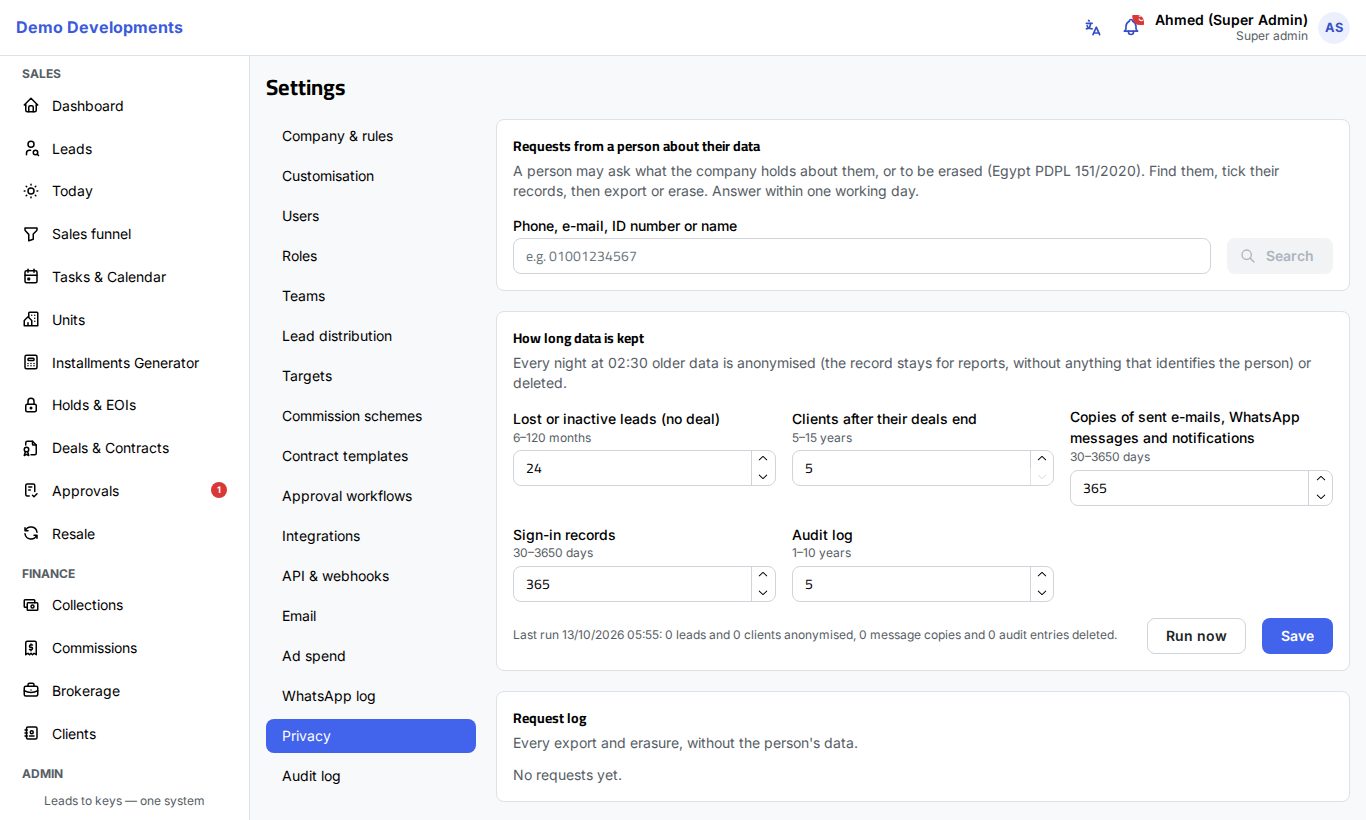
Your leads and clients have rights over their personal data under Egypt's Personal Data Protection Law (Law 151 of 2020): they may ask what your company holds about them, ask to be erased, and ask not to be contacted. Excelia CRM records where each person's consent came from, lets anyone mark a person Do not contact, and gives company admins Settings → Privacy to find a person, export their data, erase it, and set how long data is kept.
Consent and "do not contact"
Every lead page has a Consent to contact card. It shows where the person's consent came from (for example Website form, Ad form (Meta, Google, TikTok), WhatsApp chat, Walk-in, Excel import or Added by staff) and when, and whether they May be contacted or are marked Do not contact.
When a person asks not to be contacted:
- Open their lead page.
- In Consent to contact, click Do not contact.
- Write the Reason (for example "Asked by phone on 12 Oct") and confirm.
From then on ExceliaBOT sends nothing to the person, the WhatsApp button is hidden, and integrations receive the flag. Agents may still call about an open deal.
Anyone working the lead can switch Do not contact on. Switching it off (May be contacted again) is for managers (company admins, sales managers and team leaders), and only when the person asked to be contacted again: write when and how they asked.
Answer a request from a person
A person may ask what your company holds about them, or to be erased. Answer within one working day. Only company admins can do this.
Find the person
- Open Settings → Privacy.
- In Requests from a person about their data, type their phone, e-mail, ID number or name (at least 3 characters) and click Search.
- The CRM lists every matching Lead, Client and Contact person, with their phone, e-mail and details (such as their stage, their number of deals, or Do not contact).
- Tick the records that belong to this person.
Export their data
Click Export their data (JSON). The CRM downloads one file with everything it holds about the selected records (details, activities, deals, payments, messages and so on), ready to hand over to the person.
Erase their data
- Click Erase.
- Read the warning.
- Write the Reason, for example "Request received by e-mail on 12 Oct".
- Type ERASE in the confirmation box and click Erase.
Names, phone numbers, e-mails, ID numbers, notes and messages of the selected people are removed for good. A summary shows how many leads and clients were erased and how many contact persons were removed.
People with contracts or payments
A person with contracts or payments keeps those records, because tax and contract law require them, until the retention period after their deals ends. Their marketing data is erased now and they are not contacted again.
How long data is kept
The How long data is kept card sets your company's retention periods. Every night at 02:30 older data is anonymised (the record stays for reports, without anything that identifies the person) or deleted.
| Setting | What happens | Allowed |
|---|---|---|
| Lost or inactive leads (no deal) | Anonymised after this many months without activity | 6–120 months (24 by default) |
| Clients after their deals end | Anonymised this many years after all their deals ended (cancelled, terminated, or handed over and fully paid), with their contract text and documents | 5–15 years (5 by default) |
| Copies of sent e-mails, WhatsApp messages and notifications | Deleted after this many days | 30–3650 days (365 by default) |
| Sign-in records | Deleted after this many days | 30–3650 days (365 by default) |
| Audit log | Entries deleted after this many years | 1–10 years (5 by default) |
- Change the numbers you need.
- Click Save.
- Optional: click Run now to apply the periods straight away instead of waiting for the night.
Under the card you see when the last run happened and how many leads and clients it anonymised, and how many message copies and audit entries it deleted.
The request log
The Request log lists every export and erasure: the date, the kind of Request (Export or Erase), who did it, the Reason and the Result (counts only). It never shows the person's data, so it can be shown to an auditor.
Good to know
- Amounts, units and stages stay after anonymising, so your reports keep adding up.
- An erased lead shows the message Erased on its page, with the date.
- Clients' records must be kept at least 5 years after their deals end, for tax and contract records.
- Each erasure and each nightly run is also written to the audit log.
Tip
Keep the reason short and factual: when the request arrived and how (e-mail, phone, letter). It is your proof that you answered on time.