
Audit log
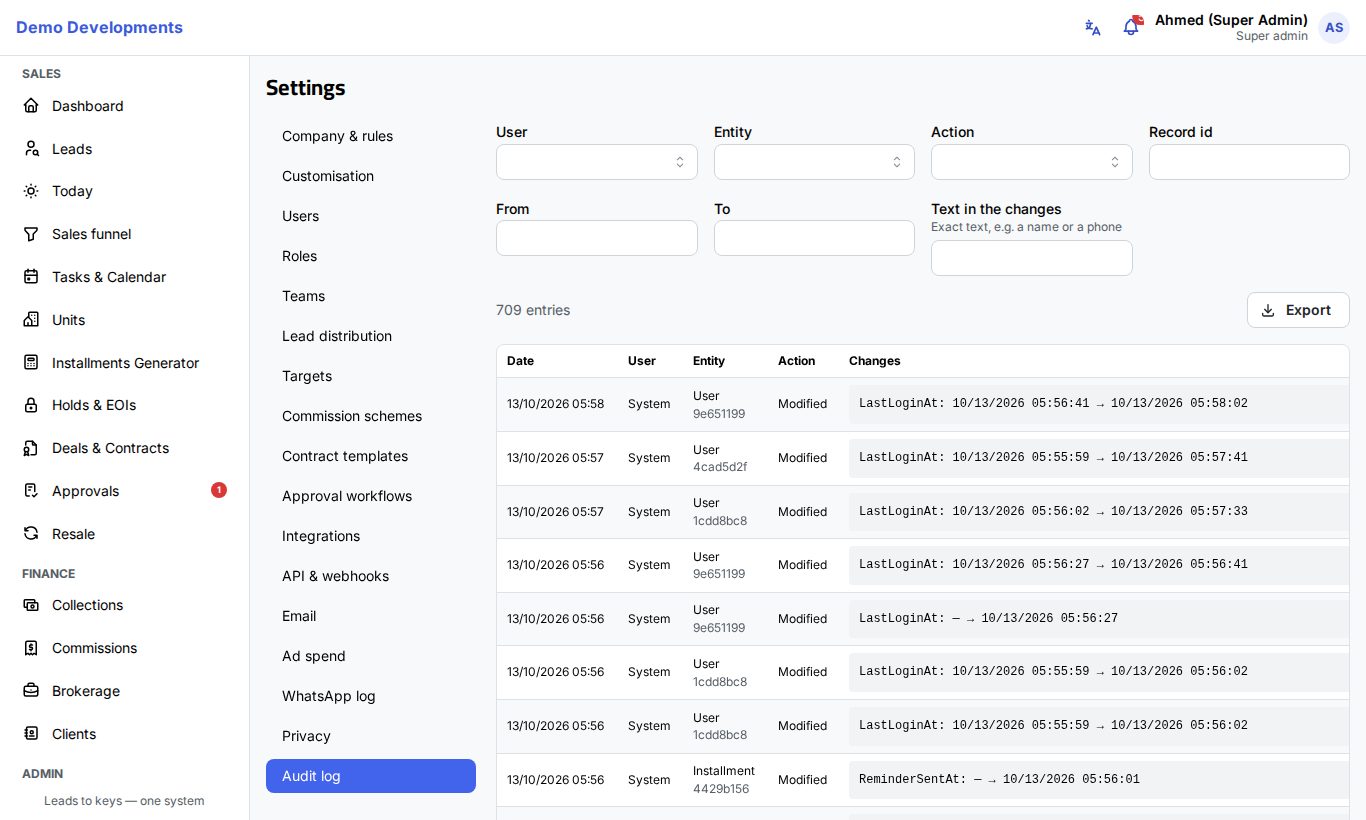
The audit log records who added, changed or deleted what in your company's CRM, and when. Use it to answer questions such as "who changed this unit's price?" or "who gave this lead to another agent?". Company admins find it on Settings → Audit log.
What is recorded
Each entry has:
- Date: when it happened.
- User: who did it, or System when the CRM did it on its own (for example an automatic reassignment or the nightly retention run).
- Entity: the kind of record (for example Lead, Deal, Unit, Payment, User or a setting), with the start of its record id under it.
- Action: Added, Modified or Deleted, or a special action such as signing a user out everywhere, resetting two-factor sign-in, undoing an import, or a privacy erasure.
- Changes: for a change, each field with its old and new value, for example "Stage: New → Contacted".
The log covers your records and settings: leads, clients, units and prices, deals, payments and cheques, approvals, users and roles, and every page of Settings.
What the log never shows
Passwords, two-factor secrets, API keys and webhook secrets are never written to the log. ID numbers and cheque or bank details show only their last 4 characters.
Find an entry
Use the filters at the top. You can combine them:
- User: what one person did.
- Entity: one kind of record, for example only units.
- Action: for example only deletions.
- Record id: one record. You can also click the short id under a record in the list to show Only this record.
- From and To: a period.
- Text in the changes: exact text, such as a name or a phone number.
The number of entries found is shown above the list. Entries are shown newest first, 50 per page; use the page numbers at the bottom to see more.
Export to Excel
- Set the filters you need.
- Click Export.
The Excel file holds the entries matching your filters (up to 50,000), with the date, user, record, record id, action and changes.
Sealed days
Every night, the previous day's entries are sealed: each day gets a digital fingerprint that is linked to the day before, and a copy is kept in separate storage. If an entry were changed, removed or slipped in afterwards, a check against the seals would show it. This makes the log trustworthy as evidence for auditors.
Entries removed on purpose are expected: entries past your retention period, and the details of a person erased on request (see Privacy and data protection).
Good to know
- Only company admins can see the audit log.
- Entries are kept for the period set on Settings → Privacy (5 years unless you change it, between 1 and 10 years).
- The rows added by an Excel import are not written one by one; the import itself appears in Previous imports on the Import data page, and undoing it is recorded here.
- Notes and calls logged on a lead are not in the audit log: they are in the lead's own activity log on the lead page.
Tip
To see the full history of one record, copy its id from the list (or click the short id) so only that record is shown, then read the changes from the bottom up.